Arg0 vs Obsidian: The Same Plain Text, With an Execution Layer
Obsidian and Arg0 both keep everything in plain files on your own disk — markdown docs, mermaid diagrams, even whiteboards. The difference is what those files can do. An honest comparison on Obsidian's own turf: docs, canvas, and openness — plus the layer Obsidian doesn't have.
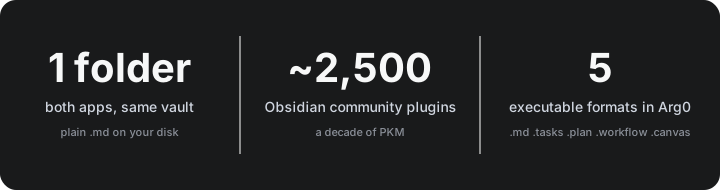
The interesting part of Arg0 vs Obsidian isn't the AI layer — it's that Arg0 competes on Obsidian's own turf. Markdown docs, diagrams, whiteboards: Arg0 covers the same checklist with the same plain-text philosophy, then adds one thing Obsidian was never designed for — files that run.
Let's compare honestly, feature against feature.
The shared foundation
Both apps agree on the parts that matter most:
- Your files are yours. Plain text in a real folder. Grep them, diff them, put them in git — no proprietary database, no export step.
- Local-first. Both work fully offline; sync is opt-in.
- Structure lives in the document, not in a sidebar of metadata.
Docs: genuine parity
Obsidian is the reference markdown editor — live preview, callouts, embeds, [[backlinks]], graph view. Arg0's Docs give you the same core surface: block-based editing, tables, code blocks, embeds — and mermaid diagrams rendered inline (flowcharts, sequence diagrams, gantt charts), just like Obsidian's mermaid support.
Honest score: for pure long-form writing polish and the knowledge-graph feel, Obsidian still leads — a decade of iteration and ~2,500 community plugins is a real moat.
Canvas: same idea, more open file
Both apps ship an infinite whiteboard with sticky notes, shapes, connectors, and freehand ink. The difference is on disk:
- Obsidian Canvas saves a
.canvasfile — the JSON Canvas spec. Open, documented, but still a machine format: you won't read your board in a text editor. - Arg0
.canvas.mdserializes the same board — nodes, edges, strokes, embedded design frames — as YAML inside a Markdown file. Open it in vim and you can read your whiteboard.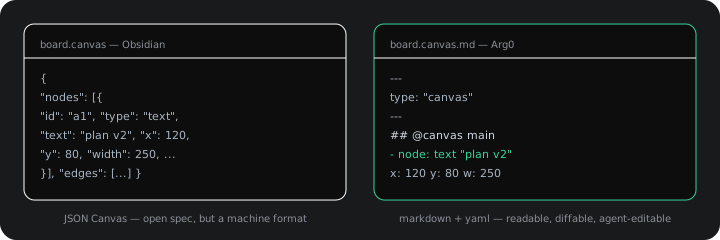
That choice compounds: diffs read like text, git history is meaningful, and anything that can read a file — a script, an LLM, an Arg0 agent — can edit the board itself.
The format family keeps going
Canvas isn't the only document Arg0 treats this way:
.ds.md— a design canvas in markdown: layout tree and tokens, handoff-ready..tasks.md— a task board as checkboxes withagent:andmcp:fields..plan.md— project plans with gantt-style structure..workflow.md— a multi-step automation graph. Every one opens in any editor — and stays useful outside Arg0.
The layer Obsidian doesn't have
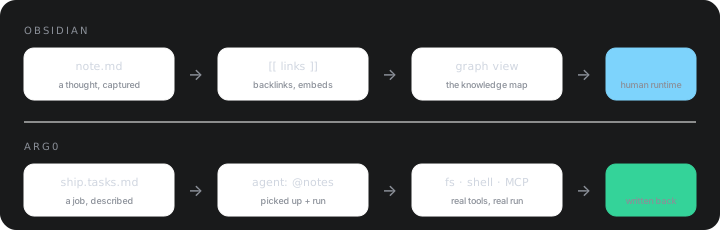
Here's where the comparison stops being feature-for-feature. In Arg0 the same plain-text files are an execution surface:
- A
.tasks.mdcard is a job — an agent with real tools (filesystem, shell, MCP servers) picks it up and writes results back. .workflow.mdruns on cron schedules, webhooks, or chat mentions.- Docs, boards, and plans can be read and written by agents — because they're just text.
Obsidian's ecosystem gets you plugins that chat about your notes. Arg0's files let agents act on them — and
agent:is just another line in the file.
Collaboration
Obsidian Sync (paid) keeps a vault in sync across devices. Arg0 Cloud goes further on this axis: docs, canvases, and plans sync in real time — CRDT-based multi-cursor editing, presence, the works. Or skip the cloud entirely: it's a folder, git works too.
Where Obsidian still wins
- Editing experience — the best plain-markdown writing UX anywhere.
- The graph — nothing beats it for seeing how notes connect.
- ~2,500 community plugins — whatever you want, someone built it.
- Publish — vault to website in minutes.
- For pure PKM — a personal knowledge base is a solved problem, and Obsidian solved it.
Bottom line
If the job is reading, writing, and linking knowledge, Obsidian remains the reference. If you want the same plain-text docs and canvases — readable formats all the way down — plus files that can act, Arg0 covers the checklist and then keeps going.
And since an Arg0 workspace is just a folder of markdown, it can literally be your vault.
Build from the docs
Install, configure, and harden Arg0 with the same reading layout.